|
First time trying one of my Tutorials? Then please check my Terms of Use before you continue
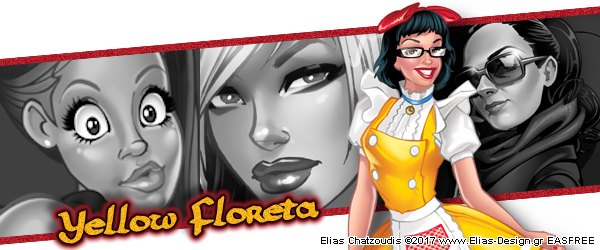
You will need: Font of your choice 4 Tubes of your choice - I will be using the artwork of Elias Chatzoudis License and Tubes now available at Creative Design Outlet
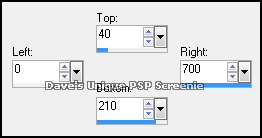
Ok let's begin Open a new image 700x250 Make a Custom Selection ... with the following settings
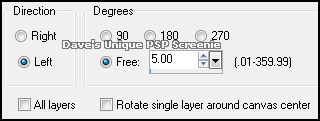
Flood Fill this Selection with Grey ... Selections> Select None Image> Free Rotate ... with the following settings
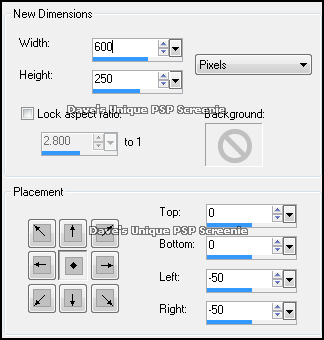
Image> Canvas Size ... with the following settings
Layers> Duplicate ... lower this layers opacity to around 60% (this is just to help with Tube placement)
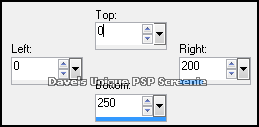
Activate the Bottom Layer Make a Custom Selection ... with the following settings
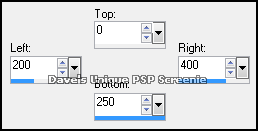
Paste your first Tube as a New Layer Move into position so what you want to keep is inside the selection Selections> Invert ... Edit> Clear ... Selections> Select None Make a Custom Selection ... with the following settings
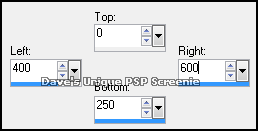
Paste your second Tube as a New Layer Move into position so what you want to keep is inside the selection Selections> Invert ... Edit> Clear ... Selections> Select None Make a Custom Selection ... with the following settings
Paste your third Tube as a New Layer Move into position so what you want to keep is inside the selection Selections> Invert ... Edit> Clear ... Selections> Select None
Activate the Top layer Selections> Select All ... Selections> Float ... Selections> Defloat Selections> Invert ... activate each Tube layer and Edit> Clear on each one ... Selections> Select None Delete the Top layer Change the Blend Mode of each Tube layer to one of your choice I use Luminance and Luminance(L)
Activate the Bottom layer ... Selections> Select All ... Selections> Float ... Selections> Defloat Selections> Modify> Expand ... by 7 ... Layers> New Raster Layer ... Flood Fill with a color from your Tube
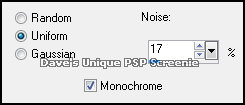
Layers> Arrange> Move Down Adjust> Add/Remove Noise> Add Noise ... with the following settings
Activate the Top layer ... Add Copyrights and your Name
Here is another example created by me using the artwork of Ismael Rac
Tutorial written on 27/12/17 ©David Hanslip |